Hreflang tags tell Google that several pages are versions of the same content in different languages or for different regions. Google then shows each searcher the version that best matches their language and location. If your site has an English page and a Hindi page for the same course, hreflang helps a Hindi searcher land on the Hindi page instead of the English one.
What does an hreflang tag look like?
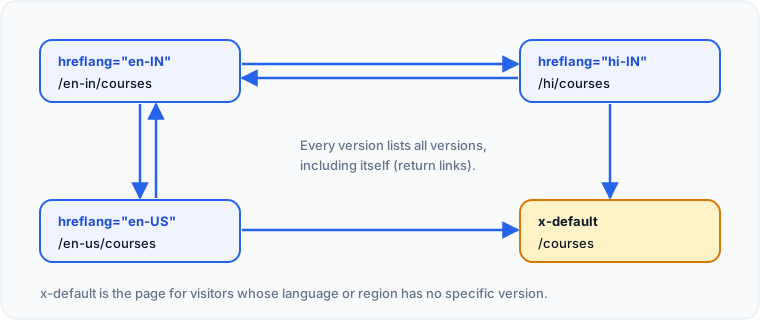
Each language version lists every version, including itself, with a link element in the <head>.
For a course offered in English for India and in Hindi:
<link rel="alternate" hreflang="en-IN" href="https://www.example.com/en/upsc-foundation/">
<link rel="alternate" hreflang="hi" href="https://www.example.com/hi/upsc-foundation/">
<link rel="alternate" hreflang="x-default" href="https://www.example.com/en/upsc-foundation/">
The same three lines go on both the English and the Hindi page. Google calls these return links. If page A points to page B but B does not point back, Google may ignore the pair.
Which codes should you use?
The value is a language code, optionally followed by a region code. The language uses ISO 639-1 and the region uses ISO 3166-1 Alpha 2.
| Code | Meaning |
|---|---|
en | English, any region |
en-IN | English for users in India |
en-GB | English for users in the United Kingdom |
hi | Hindi, any region |
hi-IN | Hindi for users in India |
x-default | Fallback when no other version matches |
The language always comes first. You cannot use a region on its own, so IN alone is invalid. en-UK is also invalid, because the United Kingdom's code is GB.
When do you need hreflang?
You need hreflang when the same page exists in more than one language, or in one language with real regional differences.
Common cases in India:
- A coaching institute with English and Hindi versions of each course page
- A study-abroad consultant with separate pages for students in India and the UAE, with different fees and phone numbers
- An edtech company with English pages priced in ₹ for India and in another currency for other markets
If your site has only one language for one country, you do not need hreflang. Adding it does no harm, but it adds nothing either.
Where can you put hreflang?
Google supports three methods, and you only need one of them for each set of pages.
linkelements in the HTML<head>, as shown above.- HTTP
Linkheaders, useful for PDFs and other non-HTML files. - Entries in your XML sitemap, which keeps the markup out of every page and suits large sites.
Pick one method and use it consistently. Mixing methods makes errors harder to find. Google's full rules are in Tell Google about localized versions of your page.
How do hreflang and canonical tags work together?
Each language version should have a self-referencing canonical, pointing to its own URL. Do not canonicalise the Hindi page to the English page. That tells Google the Hindi page is a duplicate, and it may drop it from the index, which defeats the purpose of hreflang. Our canonical tag guide explains self-referencing canonicals.
Does the HTML lang attribute matter?
The lang attribute on the <html> element declares the page's main language, for example <html lang="hi">. Google has said it does not rely on the lang attribute to work out a page's language; it reads the visible content instead. It still matters for screen readers, browser translation and other search engines, so set it correctly on every page.
What are the most common hreflang mistakes?
Most hreflang errors are small typos or missing links that quietly stop Google from pairing your versions.
- Missing return links, so the versions do not confirm each other.
- Invalid codes such as
en-UK,infor India, orhindi. - Hreflang pointing to URLs that redirect, return 404 or are noindexed.
- Relative URLs instead of full absolute URLs.
- Hindi pages that are mostly English text with a Hindi menu. Google reads the content, so translate the main content, not just the navigation.
- Automatically redirecting visitors by IP address. Googlebot mostly crawls from the US, so it may never see your other versions. Show a language switcher instead.
Hreflang checklist
- Confirm each language version has fully translated main content.
- Add hreflang for every version on every version, including a self-reference.
- Add
x-defaultfor visitors who match none of your versions. - Use valid codes such as
en-IN,hiandhi-IN. - Give each version a self-referencing canonical.
- Set the correct
langattribute on the<html>element. - Use full URLs that return 200 and are indexable.
Spider's page audit checks hreflang tags and the lang attribute, and a site crawl helps you spot language pages with missing or broken alternates across the whole site.
Check this on your own site
Spider's free check tests this and about 100 other things on any page, and links each problem to a guide like this one.