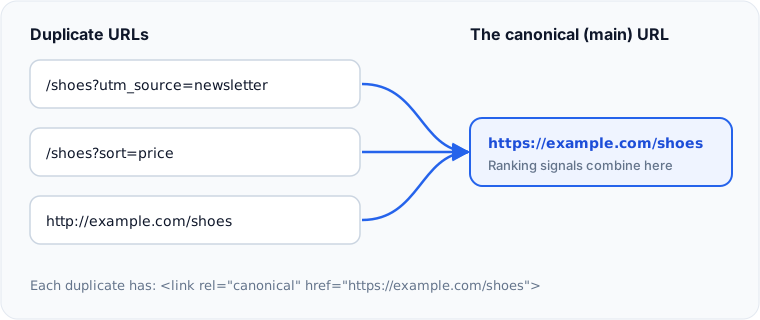
A canonical tag is a line in a page's <head> that tells search engines which URL is the main version of that content. Use it whenever the same or very similar content is reachable at more than one address, so Google combines the signals into one URL instead of splitting them across duplicates.
What does a canonical tag look like?
<link rel="canonical" href="https://www.example.com/shoes/running">Use the full absolute URL, including https:// and the domain.
When do you need one?
Duplicate URLs appear on almost every site without anyone meaning to create them:
- Tracking parameters:
/shoes?utm_source=newsletter - Sorting and filtering:
/shoes?sort=price httpandhttps, orwwwand non-wwwversions- The same product in several categories
- Printer-friendly or AMP versions
Give every indexable page a self-referencing canonical, pointing to its own clean URL. Then any duplicate version automatically points back to the main one.
Is a canonical tag a command?
No. Google treats it as a strong hint, not a directive. It may choose a different URL if your other signals disagree, for example if internal links, the sitemap and redirects all point somewhere else. Keep them consistent. You can see which URL Google chose with the URL Inspection tool in Search Console.
What are the most common canonical mistakes?
| Mistake | What happens |
|---|---|
| Canonical points to a page that returns 404 or redirects | Google ignores it or drops the page |
| Every page canonicalises to the home page | Google may ignore the tags, or treat the pages as duplicates |
| Paginated pages all point to page 1 | Content on later pages may not be indexed |
| Two different canonicals on one page | Google ignores both |
| Canonical on a page that is also noindex | Conflicting signals |
Canonical, redirect or noindex?
- Use a 301 redirect when the old URL should no longer be visited at all.
- Use a canonical when both URLs need to keep working for visitors.
- Use noindex when a page should not appear in search, and has no main version elsewhere.
Google covers this in How to specify a canonical URL.
Check this on your own site
Spider's free check tests this and about 100 other things on any page, and links each problem to a guide like this one.