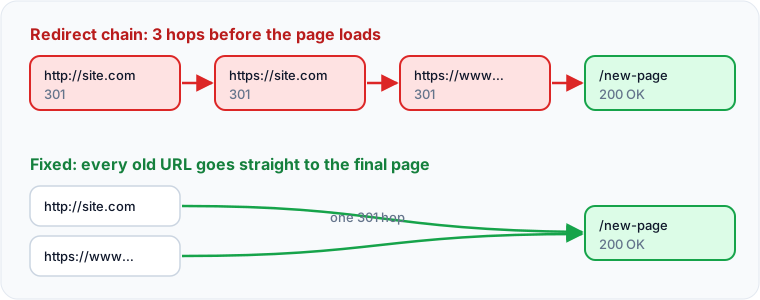
A redirect chain is when a URL redirects to another URL that redirects again before reaching the final page. A broken link points to a page that no longer exists. Both waste visitors' time and search engines' crawling, and both are easy to fix once you find them: link straight to the final URL, and redirect or remove links to pages that are gone.
Why do redirect chains matter?
Each hop adds a full round trip before the page starts loading, which is felt most on mobile. Googlebot follows up to 10 hops and then gives up, and long chains make it more likely that something in the middle breaks. Chains usually build up over years of migrations: http to https, then non-www to www, then an old slug to a new one.
Which redirect should you use?
| Code | Meaning | Use for |
|---|---|---|
| 301 | Moved permanently | Pages that have moved for good |
| 308 | Permanent, keeps the request method | Same as 301, often used by modern servers |
| 302 / 307 | Temporary | Short-term moves only |
Google passes ranking signals through both permanent and temporary redirects, but a long-lived 302 sends a mixed message about which URL to index. Use a 301 for permanent moves.
How do you fix redirect chains?
- Crawl the site to list every internal link that redirects.
- Update those links to point directly at the final URL.
- Update old redirect rules so each old URL goes to the final destination in one hop.
- Update the canonical tags and the sitemap to use final URLs only.
How do you fix broken links?
- Internal links to a page that moved: update the link and add a 301 from the old URL.
- Internal links to a page that is gone for good: remove the link, or point it at the most relevant live page.
- Links to other sites that are dead: replace them with a working source or remove them.
- Broken images: re-upload the image or remove the reference.
Should every 404 be redirected?
No. Redirect a removed page only when there is a genuinely equivalent replacement. Redirecting everything to the home page is treated by Google as a soft 404 and confuses visitors. A helpful 404 page with links to your main sections is fine.
How often should you check?
Crawl the site monthly, and after every redesign or migration. A scheduled crawl that alerts you to new broken links and errors catches problems before visitors do.
Check this on your own site
Spider's free check tests this and about 100 other things on any page, and links each problem to a guide like this one.