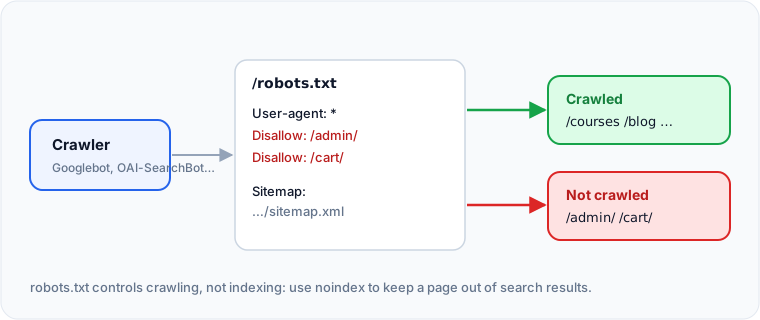
robots.txt is a plain text file at the root of a site, at /robots.txt, that tells crawlers which URLs they may request. It controls crawling, not indexing: a blocked page can still appear in Google if other sites link to it, just without a description. To keep a page out of search results, use a noindex tag and let Google crawl the page so it can see it.
What does a good robots.txt look like?
For most sites, short is best:
User-agent: *
Disallow: /admin/
Disallow: /cart/

Sitemap: https://www.example.com/sitemap.xml
This lets every crawler see everything except the admin and cart areas, and points them to the sitemap.
Which rules does Google follow?
User-agentnames the crawler a group of rules applies to.*means all crawlers.Disallowblocks a path andAllowpermits one. When rules conflict, Google uses the most specific (longest) matching rule.*matches any sequence of characters and$marks the end of a URL.Disallow: /*.pdf$blocks every PDF.- Google ignores
crawl-delay, and has not supportednoindexinside robots.txt since September 2019.
Google's full rules are in its robots.txt documentation.
What are the most common robots.txt mistakes?
Disallow: /left over from a staging site, which blocks the whole site.- Blocking CSS or JavaScript files, which stops Google rendering the page properly.
- Blocking a page you want removed from search. Google cannot see its noindex tag, so it may stay indexed.
- A robots.txt that returns a server error. Google may stop crawling the site until it is fixed.
How do you allow or block AI crawlers?
Each AI company publishes its crawler names. The training crawlers collect content for model training; the search and user crawlers fetch pages to answer questions in real time. Blocking the answer-time crawlers removes you from those assistants' answers.
# Allow AI assistants to read and cite the site
User-agent: OAI-SearchBot
User-agent: ChatGPT-User
User-agent: PerplexityBot
User-agent: Claude-SearchBot
Allow: /

# Opt out of model training only
User-agent: GPTBot
User-agent: ClaudeBot
User-agent: Google-Extended
Disallow: /
Google-Extended controls whether Google uses your content for Gemini training and grounding. It does not affect Google Search or AI Overviews, which use the normal Googlebot.
Check your CDN too
Some CDNs and firewalls can block AI crawlers before they ever read robots.txt. If assistants never cite your site, check your CDN's bot settings as well as the file.
Check this on your own site
Spider's free check tests this and about 100 other things on any page, and links each problem to a guide like this one.